
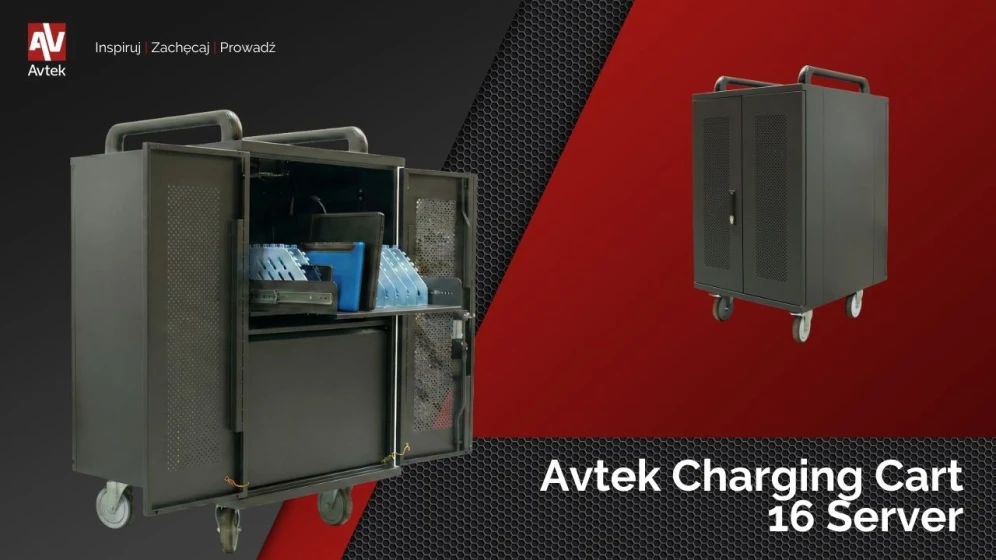
New: Avtek Charging Cart 16 Server laptop charging cabinet | Mobile IT station
Modern educational institutions and offices require solutions that combine mobility with the security of electronic equipment. The Avtek Charging Cart 16 Server laptop charging cabinet is an advanced product designed for the effective management of a mobile device fleet. It allows for the secure storage, charging, and transport of laptops between rooms in an organized and ergonomic manner.
Functionality and IT infrastructure space in the Avtek cabinet
The Avtek Charging Cart 16 Server model stands out in the market due to its unique design, which goes beyond standard laptop carts. In addition to space for 16 mobile devices in the main section, the product offers an additional, spacious compartment measuring 450 x 450 x 410 mm. This space enables the installation of key network infrastructure elements, such as a server, a UPS uninterruptible power supply, or a printer. Thanks to this solution, the cabinet serves as a fully functional, mobile technological hub.
Electrical safety and sequential laptop charging
The safety of the connected equipment is a priority, which is why the Avtek cabinet is equipped with an intelligent power management system. The built-in timer implements sequential charging, divided into 4 sections of 4 sockets each. This protects the electrical installation from sudden overloading that could occur if power were started for all units simultaneously. Comprehensive protection against overload, short circuits, surges, and overcharging guarantees a long life for laptop batteries.
Key features and technical parameters
Our Avtek Charging Cart 16 Server laptop charging cabinet has many features that help optimize daily work:
built-in cable organizer to help maintain order
sliding drawers for devices for convenient access
handles and sturdy wheels for easy moving between rooms
intelligent cooling system protecting against overheating
rubber wheels with locks ensuring stability when stationary
indicator lights showing the current charging status
separate storage compartments for power adapters to save space in the main chamber
2 m long power cable providing adequate range
solid SPCC steel construction resistant to intensive use
The introduction of the Avtek Charging Cart 16 Server model is a significant step forward in our range of mobile solutions. Unlike previous generations of cabinets, which served exclusively for the storage and powering of laptops alone, the new Server model has been designed as a complete foundation for IT infrastructure.
Check out similar articles
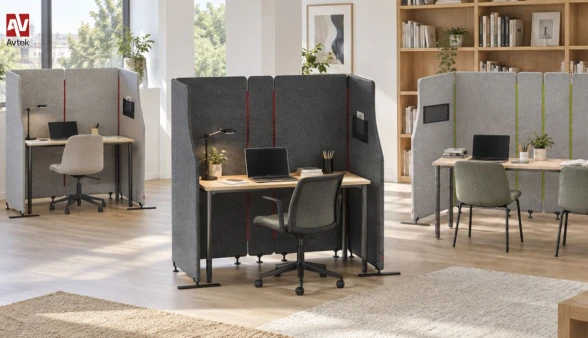
Avtek SonoVelo - acoustic room divider for offices and educational facilities
Modern spaces—from dynamic open-plan offices and educational institutions to quiet zones in libraries - present daily challenges related to noise and a lack of privacy. If you are looking for an effective way to quiet down a workspace without costly renovations, the Avtek SonoVelo acoustic room divider is the ideal solution. This innovative room divider makes it easy to create a comfortable space for working, studying, or holding conversations without the need for permanent walls or any structural alterations to the room.
Thanks to its modular design, the Avtek SonoVelo offers complete flexibility when arranging public, educational, and commercial environments. Available in three sizes and four color options, it can easily be tailored to single workstations as well as larger, collaborative team areas.
A Zone for Focus and Quiet
Concentration becomes much easier right where you need it most. This mobile acoustic partition effectively isolates a workstation even in the middle of a bustling room, creating a private, cozy atmosphere. Users can focus better on their tasks while staying connected to their surroundings. It is a practical solution that excels in classrooms, libraries, open-plan offices, and modern coworking hubs.
Flexibility to Match Daily Changes
One of the system's greatest advantages is its ability to adapt as fast as your day does. Room layouts no longer need to be permanent; the freestanding, modular construction of the SonoVelo allows you to effortlessly configure individual desks, larger collaborative setups, or several independent nooks. Whenever the needs of a team, classroom, or library change, the spatial layout can be transformed in seconds.
Thoughtful Details and Functional Form
Aesthetics and convenience go hand in hand with practical features for everyday use. The individual panels are connected with zippers that serve a dual purpose: a functional mechanism and a distinctive design signature. They maintain the structural integrity while contrast colors lend a modern, dynamic look. Additionally, a handy mesh pocket on the side panel provides convenient storage for documents, notebooks, class materials, or small accessories you need close at hand.
Versatile Configuration Options
Layout possibilities expand even further with the optional Avtek L-Foot support stand. This accessory enables two complete screen sets to be placed directly side by side, creating neat, continuous rows of workstations in open-plan offices, study halls, or computer labs without unwanted gaps. Furthermore, the single-sided profile of the L-Foot is perfect when placing screens close to walls or furniture, taking up space on just one side and preventing collisions that standard T-shaped bases might cause.
Avtek C-Fiber USB-C Optical Cable - New in our offer
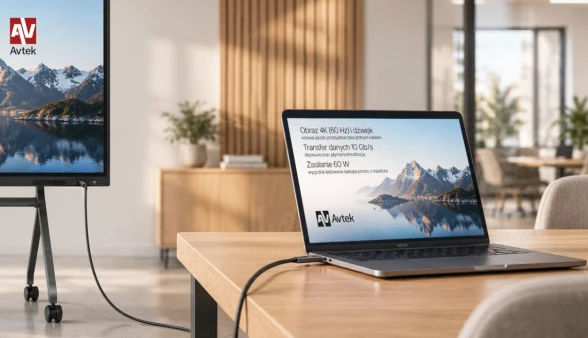
We are introducing a new product to our offer - the Avtek C-Fiber active optical USB-C cable. This solution allows you to connect a laptop to an interactive monitor using just a single cord. It simultaneously transmits image, audio, data, and touch control, while additionally enabling computer power supply of up to 60 W via Power Delivery technology. Thanks to this, each workstation becomes ready for work much faster, we eliminate unnecessary cords on the table, and the entire space gains an aesthetic and fully professional appearance. The cable is available in lengths of 5, 10, and 15 meters, which ensures complete freedom of laptop placement regardless of where the monitor is mounted. Its hybrid fiber-optic and copper construction simply and reliably combines lightning-fast signal transmission with efficient power delivery. This is precisely why Avtek C-Fiber is ideal for conference rooms, training rooms, and classrooms where an ordinary, short cord turns out to be simply insufficient.
One cord and full integration with the interactive monitor
Instead of using a separate cord for image transmission and another USB cable responsible for touch control, our new C-Fiber guarantees a complete connection using a single USB-C connector. It is enough to connect the computer and immediately start a presentation, lesson, or meeting without wasting time on tedious arrangement of multiple cords around the workstation.
Importantly, after connecting to the interactive monitor, all content can be comfortably operated directly on its screen. The presenter remains at the monitor, smoothly scrolls through content, makes annotations, and controls applications while the laptop rests safely on the desk or lectern.
Convenient space arrangement and efficient Power Delivery
A cable length reaching up to 15 meters allows for the free placement of the laptop on a table, lectern, or desk even when the monitor is located on the other side of the room. The user gains work comfort exactly where it is most convenient for them, and the cable can be routed in a very aesthetic way along the wall, under a raised floor, or in a cable tray. Furthermore, Power Delivery supplying up to 60 W allows you to charge a compatible laptop without the need to run a separate power cable to the desk. During a meeting or lesson, the computer constantly works and replenishes energy through the exact same connection used to transmit image, data, and the touch signal.
High data transmission speed and crystal-clear 4K 60 Hz image
Our cable offers data transfer at up to 10 Gb/s, which significantly streamlines and speeds up work with large files and additional USB accessories. In turn, the image in 4K resolution at a 60 Hz refresh rate remains perfectly sharp and smooth on the large screen. All of this makes Avtek C-Fiber a reliable connection that works perfectly during everyday presentations, work with demanding multimedia materials, video conferences, as well as permanent, everyday workstation operation.
How to equip a modern conference room?
An important meeting, a new client, and the first ten minutes wasted fighting with cables and malfunctioning equipment. Such a scenario can ruin any presentation, even the best prepared one. In a modern company, the conference room is meant to support business, not generate unnecessary stress.
To create a space that impresses guests and streamlines the team's daily work, it is worth moving away from half-measures (like a regular home TV) and investing in a well-thought-out ecosystem of AV tools. See what a functional room consists of and what to look for when choosing equipment.
Interactive displays - say goodbye to boring presentations
Classical projectors with weak lamps and traditional TVs are a thing of the past in business. Today, the command center in the conference room consists of interactive displays - and for several very practical reasons.
By choosing a monitor from the Avtek TouchScreen series, you get an "all-in-one" device. Not only do you display your presentation in high 4K resolution (which guarantees readability even on a very bright, sunny day), but you can also write on it directly, make real-time corrections, and save the results of a brainstorming session with a single click.
What is more, thanks to the built-in Android system and the optional OPS computer module with Windows, you can launch a video conference on Teams, Zoom, or Google Meet directly from the screen. The absence of cables on the table is not only about aesthetics, but also immense convenience.
Mobility - give your screen some freedom
Even the best display will lose its functionality if you mount it at the wrong height or in a place where light reflects straight into the participants' eyes.
If your company has several rooms or a flexible open space, Avtek mobile stands are a great solution (check out the Avtek TS Electric Stand Light). They provide complete freedom - you can push the monitor to wherever it is needed in a matter of seconds.
Avtek monitor stands feature electric height adjustment. They allow you to smoothly adjust the position of the monitor with a single button. This is a detail that makes a huge difference when speakers of different heights take turns at the screen or when you use the interactive board from a sitting position.
Clear sound is fundamental
During hybrid meetings, the worst thing that can happen is poor audio. While we can forgive poor video quality, noise, echo, and audio dropouts can completely ruin a presentation.
Instead of relying on quiet speakers built into a laptop or monitor, choose Avtek soundbars and audio kits. They are designed specifically with human speech in mind - they boost the vocal range, eliminate unwanted reverberations from the room, and make people on the other side of the camera hear every participant as if they were sitting right next to them.
Zero cables on the table - opt for simple connectivity
Nothing ruins the aesthetics of a new room quite like a tangle of wires running across the middle of the table. The solution to this problem is wireless image transmission, for example using Avtek ViClick systems.
This works in a simple way: you connect a small transmitter to your laptop, click a button, and your desktop immediately appears on the large screen. No driver installation, no asking the IT department for passwords, and no searching for the right plug. Every meeting participant can take over the screen and show their materials in seconds.
Good equipment is an investment that pays off
A well-thought-out conference room based on Avtek equipment, from the interactive display and stable stand to clear sound systems, simply takes technology off the presenter's mind. Meetings start on time, decisions are made faster, and your company presents itself in a fully professional manner.
Avtek PylonLift Wings: A modern lesson workstation for every classroom
Modern school needs tools to seamlessly bridge the digital world with traditional teaching methods. The answer to these needs is the Avtek PylonLift Wings, a wall-to-floor mounting system designed specifically for interactive displays. This solution creates a complete and comfortable space for conducting lessons, presentations, and engaging group exercises.
Tradition meets modernity in one place
The Avtek PylonLift Wings system is an excellent combination of interactive display functionality and the convenience of a classic school whiteboard. The central part is reserved for the display, while wing boards are placed on both sides. Thanks to this, the teacher gains additional workspace without the need to constantly switch between programs or close displayed materials.
While the display is used to show materials, models, or interactive tasks, the side wings allow for writing formulas, notes, and key lesson conclusions on the fly. All knowledge remains within the students' field of view, making it easier to maintain focus and ensuring the lesson is more legible.
Smooth, effortless height adjustment
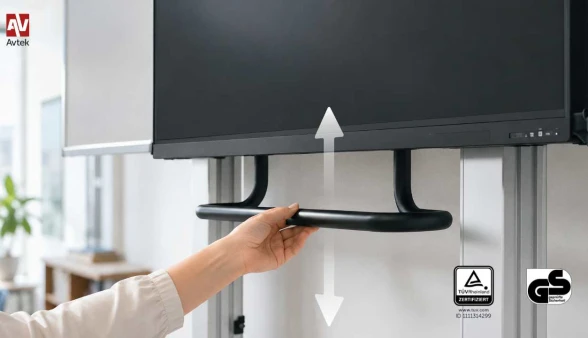
One of the most important advantages of the Avtek PylonLift Wings system is its height adjustment based on a counterweight mechanism. Changing the position of the entire setup is incredibly light, fast, and, importantly, requires no electrical power. To raise or lower the structure, simply grab the handy grip and move it in the desired direction. The lack of electric motors means no waiting for a motor to operate and full reliability under all conditions.
The adjustment range is up to 950 mm, which allows for a perfect fit of the screen to current needs. This is of huge importance in kindergartens and lower primary school classes. The screen can be positioned lower so that the youngest students can comfortably use interactive games and educational activities. On the other hand, in its highest position, the monitor becomes perfectly visible to the entire class during presentations or board work.
A surface built for intense work
The side wings of the Avtek PylonLift Wings utilize PolyVision® whiteboard surfaces, highly valued in education. This is a smooth, ceramic-steel surface designed specifically for heavy use in schools. It guarantees excellent legibility of handwriting, smooth marker gliding, and exceptionally easy dry-erasing of notes. The teacher does not have to choose between new technology and traditional writing, as both worlds coexist side by side, allowing for a natural flow of the class.
Additional space and protection for valuable equipment
The design of the system brings yet another practical benefit. When the wings are opened, the working surface increases drastically, providing plenty of space for drawings and notes for the whole group. However, when closed, the boards form a compact and aesthetic shape. In this position, the wings act as a protective cover, helping to shield the monitor from impacts, dirt, and daily wear and tear. Stable wall and floor mounting ensures that the entire setup remains secure even during intensive everyday use.
