
How to equip a modern conference room?
An important meeting, a new client, and the first ten minutes wasted fighting with cables and malfunctioning equipment. Such a scenario can ruin any presentation, even the best prepared one. In a modern company, the conference room is meant to support business, not generate unnecessary stress.
To create a space that impresses guests and streamlines the team's daily work, it is worth moving away from half-measures (like a regular home TV) and investing in a well-thought-out ecosystem of AV tools. See what a functional room consists of and what to look for when choosing equipment.
Interactive displays - say goodbye to boring presentations
Classical projectors with weak lamps and traditional TVs are a thing of the past in business. Today, the command center in the conference room consists of interactive displays - and for several very practical reasons.
By choosing a monitor from the Avtek TouchScreen series, you get an "all-in-one" device. Not only do you display your presentation in high 4K resolution (which guarantees readability even on a very bright, sunny day), but you can also write on it directly, make real-time corrections, and save the results of a brainstorming session with a single click.
What is more, thanks to the built-in Android system and the optional OPS computer module with Windows, you can launch a video conference on Teams, Zoom, or Google Meet directly from the screen. The absence of cables on the table is not only about aesthetics, but also immense convenience.
Mobility - give your screen some freedom
Even the best display will lose its functionality if you mount it at the wrong height or in a place where light reflects straight into the participants' eyes.
If your company has several rooms or a flexible open space, Avtek mobile stands are a great solution (check out the Avtek TS Electric Stand Light). They provide complete freedom - you can push the monitor to wherever it is needed in a matter of seconds.
Avtek monitor stands feature electric height adjustment. They allow you to smoothly adjust the position of the monitor with a single button. This is a detail that makes a huge difference when speakers of different heights take turns at the screen or when you use the interactive board from a sitting position.
Clear sound is fundamental
During hybrid meetings, the worst thing that can happen is poor audio. While we can forgive poor video quality, noise, echo, and audio dropouts can completely ruin a presentation.
Instead of relying on quiet speakers built into a laptop or monitor, choose Avtek soundbars and audio kits. They are designed specifically with human speech in mind - they boost the vocal range, eliminate unwanted reverberations from the room, and make people on the other side of the camera hear every participant as if they were sitting right next to them.
Zero cables on the table - opt for simple connectivity
Nothing ruins the aesthetics of a new room quite like a tangle of wires running across the middle of the table. The solution to this problem is wireless image transmission, for example using Avtek ViClick systems.
This works in a simple way: you connect a small transmitter to your laptop, click a button, and your desktop immediately appears on the large screen. No driver installation, no asking the IT department for passwords, and no searching for the right plug. Every meeting participant can take over the screen and show their materials in seconds.
Good equipment is an investment that pays off
A well-thought-out conference room based on Avtek equipment, from the interactive display and stable stand to clear sound systems, simply takes technology off the presenter's mind. Meetings start on time, decisions are made faster, and your company presents itself in a fully professional manner.
Check out similar articles
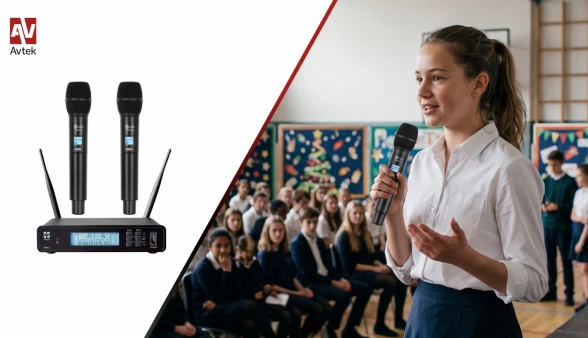
New Product – Wireless Set with Two Handheld Microphones Avtek WME 2H
Wireless Freedom on a Reasonable Budget
The Avtek WME 2H is a reliable wireless microphone set designed for school assemblies, kindergarten performances, and corporate meetings. It is a cost-effective solution for educational institutions and event organizers looking for practical voice amplification at an affordable price.
On-stage interviews, co-hosting an event, or performing a duet? Two handheld microphones and a dual-channel receiver allow two people to use the set simultaneously. Metal housings are a solid advantage in equipment used by various hosts and performers, demonstrating that a budget-friendly audio choice does not mean sacrificing durable build quality.
Flexible Connectivity to Sound Systems
Two independent XLR outputs allow you to send the audio signal from each microphone separately directly to a mixer. Alternatively, if you prefer a simpler connection, the shared 6.35 mm jack output delivers the signal from both microphones through a single cable. Thanks to this, the Avtek WME 2H microphone set can be easily adapted to various sound system configurations without being limited to a single connection method.
Fast Setup and User Convenience
Efficient preparation of stage equipment is key before any event. The receiver's clear LCD display, intuitive frequency adjustment, and quick pairing help smoothly set up the wireless system for operation. With 100 channels available for each track, choosing a transmission frequency is never limited to just one option.
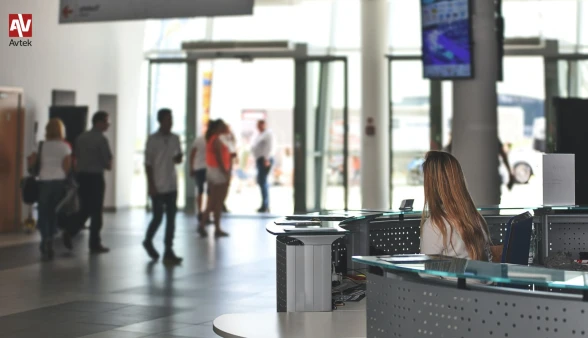
Digital Signage in Government Offices and Healthcare Facilities – How to Improve Communication with Citizens and Patients?
Traditional notice boards, paper posters, and printed clinic schedules are slowly becoming a thing of the past. In modern public offices and healthcare facilities, fast, clear, and seamless communication with citizens and patients has become essential. Professional Digital Signage displays meet these needs directly. How do advanced informational monitor systems transform the experience of patients and citizens, and why is it worth choosing this solution?
1. Communication Challenges in Public Spaces
In municipal offices, outpatient clinics, and hospitals alike, the first challenge for visitors is navigating the space and accessing up-to-date information.
Showcases overloaded with paper sheets, unreadable signage, or constant changes in doctors' consultation hours lead to confusion, extend service times, and increase stress levels. Furthermore, printing new notices every time a change occurs represents an ongoing cost and an extra workload for staff.
Informational displays (Digital Signage) solve this issue seamlessly: they transform the space into an interactive, dynamic information hub.
2. Applications of Digital Signage Displays in Healthcare Facilities
In medical clinics and hospitals, digital screens fulfill several key functions:
-
Wayfinding & Navigation: Dynamic maps and directions guide patients to the appropriate offices, wards, or blood collection points.
-
Queue Management Integration: Integrating displays with queuing systems allows real-time rendering of the current patient number and room number, eliminating questions like "Who is last in line?".
-
Patient Education: Waiting time before an appointment can be used to showcase educational materials, information on preventive care programs, or instructions on how to prepare for medical examinations.
-
Emergency Notifications: In emergency situations, screens immediately display evacuation procedures or crucial public health announcements.
3. Digital Signage in Government and Administrative Offices
In municipal offices, district authorities, and public administration facilities, digital displays raise the standard of customer service:
-
Paperless Announcements: Displaying public notices, spatial development plans, or official announcements without needing to print hundreds of pages.
-
Service Area Zoning: Clear division into service zones (e.g., ID cards, vehicle registration, taxes) makes it easy to quickly locate the right window.
-
Community Engagement: Presenting information about cultural events, civic budgets, or public consultations.
4. Technology Built for Continuous Operation
Working in an office or healthcare facility demands high reliability. Standard consumer TVs are not built to operate for long hours daily in brightly lit environments.
The Avtek DS2 series monitors are designed specifically for professional commercial applications:
-
Commercial-Grade Reliability: Guaranteed stable continuous operation without the risk of system failure or panel burn-in.
-
High Brightness: Excellent visibility of content even in brightly lit lobbies and waiting areas.
-
Versatile Sizes: Ranging from smaller screens mounted next to consultation rooms (e.g., 43") to large-format displays for main entrance halls (e.g., 75" or 86").
-
Flexible Media Playback: Capability to play content directly from USB storage or via a local network.
5. Remote Content Management with AvtekSign
Hardware is only half the battle; easy management of the displayed content is equally vital. The AvtekSign system allows centralized management of the entire network of monitors in a facility—or even across multiple branches—directly from a single web browser.
Key Benefits of AvtekSign:
-
Scheduling: Plan what content should be displayed in the morning (e.g., reception hours) and what should appear in the afternoon.
-
Screen Zoning: Simultaneously display educational videos, a news ticker with live updates, and the called patient queue number.
-
Instant Updates: Change a message across all screens in the building in seconds without having to manually approach each monitor with a USB flash drive.
Market research in the healthcare Digital Signage sector (including analyses conducted by Digital Signage Today and Samsung Healthcare Solutions) indicates that implementing digital screens in waiting rooms reduces patients' perceived waiting time by up to 35%. Engaging, dynamic content effectively distracts from the clock and lowers stress levels before appointments.
Digital Transformation at Your Fingertips
Deploying Digital Signage systems such as the Avtek DS2 with AvtekSign software offers not only a modern image for your facility, but above all real time savings for staff and higher satisfaction levels for citizens and patients.
-
Looking for a solution tailored to your facility or office? Contact the Avtek team—we will help you select the right displays, mounts, and software.
Frequently Asked Questions (FAQ)
Q: Do I need an advanced IT department to manage Avtek DS2 monitors?
A: No. AvtekSign software was designed with intuitive operation in mind. Changing content or uploading a new graphic file is as simple as attaching a file to an email.
Q: How does a Digital Signage display differ from a regular TV?
A: Digital Signage monitors feature reinforced commercial components for extended operating hours (e.g., 18/7), higher panel brightness, no manufacturer ads on startup, support for both portrait and landscape mounting, and advanced menu lock features to prevent unauthorized access.
Q: Can Avtek DS2 screens operate in portrait orientation?
A: Yes, the Avtek DS2 series is engineered for both landscape and portrait orientations, making it ideal for displaying schedules, doctor lists, or digital posters.
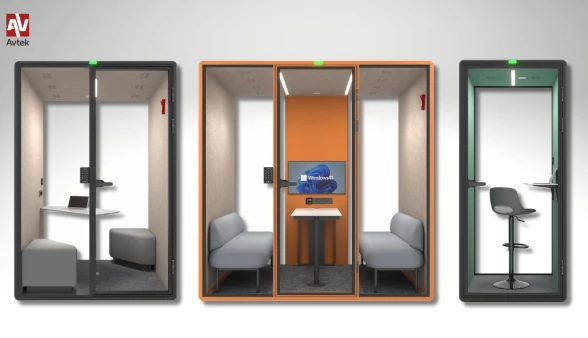
A quiet revolution in the open space: Meet the Avtek SonoCubo Meeting Pods
Modern open-space offices foster integration and dynamic brainstorming, but they bring one massive challenge — noise. Overlapping phone calls, notifications, spontaneous discussions, and continuous video calls make tasks requiring deep focus difficult to carry out. How can you create a comfortable environment for work or study in an office or school without resorting to expensive and time-consuming renovations?
The answer to the needs of modern workspaces is Avtek SonoCubo - an innovative series of modular meeting pods that allows you to create a private, perfectly soundproofed space right where it is needed most.
3 Sizes of Meeting Pods
The product family includes three size options:
-
SonoCubo S (1-person model): A compact focus meeting pod designed for deep work, phone calls, and video conferences.
-
SonoCubo M (2-person model): A dedicated space for one-on-one meetings, recruitment, or collaborative work for two people.
-
SonoCubo L (4-person model): A spacious conference meeting pod that easily replaces a traditional meeting room. It features a rear wall adapted for monitor mounting, making it an ideal spot for presentations, team huddles, and multimedia brainstorming sessions.
The main advantage of Avtek acoustic furniture is its modularity — creating a fully functional workspace without the need to build permanent partition walls or alter the building’s structure.
Smart Technologies and Everyday Comfort
Avtek SonoCubo meeting pods offer not only superior sound isolation, but above all, a modern workstation equipped with technologies that enhance user comfort:
-
Innovative Access Control (SonoCubo M and L): Security and organized bookings are guaranteed by the ability to unlock the door using an access card or an individual PIN code. It is an ideal solution for space management in large offices.
-
Occupancy Indicator: Clear external signaling instantly informs other employees whether the meeting pod is free or if a meeting is in progress.
-
Fast USB-C Power Delivery Charging: Integrated sockets featuring USB-C PD technology allow high-speed charging for laptops, tablets, and smartphones directly during work or video calls.
Excellent Acoustics and Touch Panel Control
The Avtek SonoCubo acoustic booth features a multi-layered wall structure with a durable aluminum frame and safety laminated glass panels. The interior effectively dampens noise while preserving an uninterrupted flow of natural light.
Ideal interior conditions are maintained via a built-in touch panel, allowing real-time control over key functions:
-
Ensures continuous air circulation and fresh air, even during long meetings.
-
Brightness and color temperature adjustments ranging from 3000K to 6000K allow you to tailor the lighting for focus or relaxation.
-
Guarantees natural color rendition and a professional appearance on camera during video calls.
Why Invest in Avtek Acoustic Furniture?
Investing in Avtek SonoCubo meeting pods is a fast, modern, and flexible way to optimize office space. Instead of incurring construction costs and enduring disruptive renovations, you get a mobile, intelligent solution that can easily be adapted or relocated whenever needed.
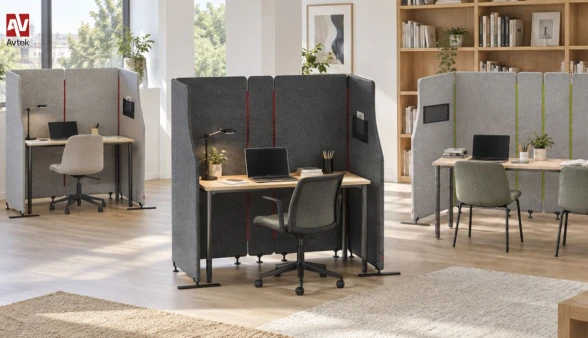
Avtek SonoVelo - acoustic room divider for offices and educational facilities
Modern spaces—from dynamic open-plan offices and educational institutions to quiet zones in libraries - present daily challenges related to noise and a lack of privacy. If you are looking for an effective way to quiet down a workspace without costly renovations, the Avtek SonoVelo acoustic room divider is the ideal solution. This innovative room divider makes it easy to create a comfortable space for working, studying, or holding conversations without the need for permanent walls or any structural alterations to the room.
Thanks to its modular design, the Avtek SonoVelo offers complete flexibility when arranging public, educational, and commercial environments. Available in three sizes and four color options, it can easily be tailored to single workstations as well as larger, collaborative team areas.
A Zone for Focus and Quiet
Concentration becomes much easier right where you need it most. This mobile acoustic partition effectively isolates a workstation even in the middle of a bustling room, creating a private, cozy atmosphere. Users can focus better on their tasks while staying connected to their surroundings. It is a practical solution that excels in classrooms, libraries, open-plan offices, and modern coworking hubs.
Flexibility to Match Daily Changes
One of the system's greatest advantages is its ability to adapt as fast as your day does. Room layouts no longer need to be permanent; the freestanding, modular construction of the SonoVelo allows you to effortlessly configure individual desks, larger collaborative setups, or several independent nooks. Whenever the needs of a team, classroom, or library change, the spatial layout can be transformed in seconds.
Thoughtful Details and Functional Form
Aesthetics and convenience go hand in hand with practical features for everyday use. The individual panels are connected with zippers that serve a dual purpose: a functional mechanism and a distinctive design signature. They maintain the structural integrity while contrast colors lend a modern, dynamic look. Additionally, a handy mesh pocket on the side panel provides convenient storage for documents, notebooks, class materials, or small accessories you need close at hand.
Versatile Configuration Options
Layout possibilities expand even further with the optional Avtek L-Foot support stand. This accessory enables two complete screen sets to be placed directly side by side, creating neat, continuous rows of workstations in open-plan offices, study halls, or computer labs without unwanted gaps. Furthermore, the single-sided profile of the L-Foot is perfect when placing screens close to walls or furniture, taking up space on just one side and preventing collisions that standard T-shaped bases might cause.
